Intelligent Observability Instrument for Physical AI
Operate, observe, and debug robots, while Osiris connects the dots for you.
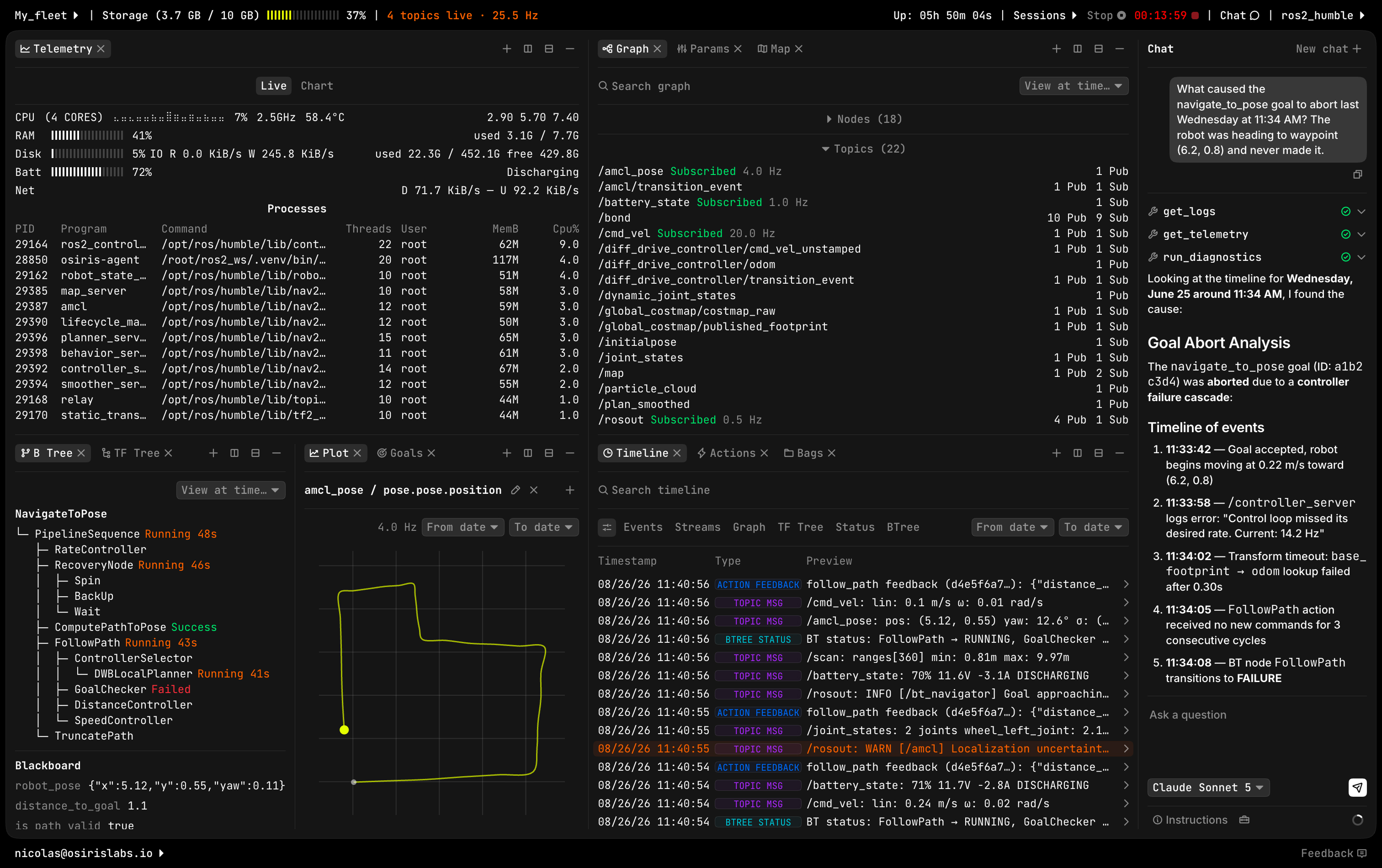
Connect what’s scattered.
Everything your robot reports, in one workspace, coupled with intelligence that traces the connections for you.
See your robot's state live or post-hoc, across 14 different views.
All events in order, so failures trace themselves back to their cause.
Investigate incidents, surface patterns, and execute multi-step plans.
Turn your robot’s output into answers
Describe what you want in plain language, or send Nav2 actions directly yourself. Either way, Osiris checks safety preconditions and executes step by step, taking live readings along the way for later analysis.
“Drive the robot 1m forward, take an odom reading, and compare it to the LiDAR’s distance to the wall, and report back.”
See your robot's full state as it happens: full graph, params, topic messages, and system resources, streamed live with per-topic rate and bandwidth limits you control. No SSH or local ROS setup required.
“What’s the current CPU and memory load on the bt_navigator node?”
Something already went wrong: reconstruct exactly why. Behavior tree state, TF, telemetry, and topic messages, correlated around the moment it happened, so you're not piecing it together from scattered logs by hand.
“Show me what happened around 14:32: behavior tree state, TF, and telemetry, all together.”
Pull up the camera feed or the full 3D point cloud, live or from any past session, right in the same pane grid as everything else, with the same bandwidth controls, instead of a separate viewer or a manually replayed recording.
“What did the camera see right before it stopped at the doorway?”
Describe what you want in plain language, or send Nav2 actions directly yourself. Either way, Osiris checks safety preconditions and executes step by step, taking live readings along the way for later analysis.
“Drive the robot 1m forward, take an odom reading, and compare it to the LiDAR’s distance to the wall, and report back.”
Built for the network you actually have
Most connections aren’t ideal. Osiris is built to handle that.
Binary, not JSON. Sensor data travels as raw bytes over the wire instead of bloated JSON arrays. Same data, a fraction of the size.
No inbound connections. The agent connects out to Osiris. Nothing needs to be opened, forwarded, or exposed on the robot's network.
Every topic, capped and visible. Set a rate or bandwidth limit per topic, and see exactly what's being delivered against it, live.
Check in from anywhere. No VPN, no static IP, no need to be on the robot's network. Just a lightweight agent streaming out.
Binary, not JSON. Sensor data travels as raw bytes over the wire instead of bloated JSON arrays. Same data, a fraction of the size.
No inbound connections. The agent connects out to Osiris. Nothing needs to be opened, forwarded, or exposed on the robot's network.
Every topic, capped and visible. Set a rate or bandwidth limit per topic, and see exactly what's being delivered against it, live.
Check in from anywhere. No VPN, no static IP, no need to be on the robot's network. Just a lightweight agent streaming out.
Everything visible to you, in one place
CPU, RAM, disk, and network usage, charted live or over any period in the last 30 days.
Setup has never been easier.
Add your robot and generate its auth token from the web app.
One pip install, inside your ROS2 environment, and you're ready.
Add your robot and generate its auth token from the web app.
One pip install, inside your ROS2 environment, and you're ready.
Request access
We’re currently in private beta. Apply for early access and we’ll get back to you within 24h.